Local-first desktop project planning
See the work. Understand the time.Know what comes next.
Continuum helps you map tasks, dependencies, available time, and progress without turning your work into another management dashboard.
Desktop app · Local-first · Built for solo use
01
The problem
Complex work is hard enough to understand. The software should not make it harder.
Project planning can turn into another project: dashboards, reports, automations, metrics, assistants, notifications, and layers of controls between you and the thing you are actually trying to build.
Continuum takes the opposite position. Show the work. Show the time. Make the relationships clear. Then get out of the way.
Task Timeline
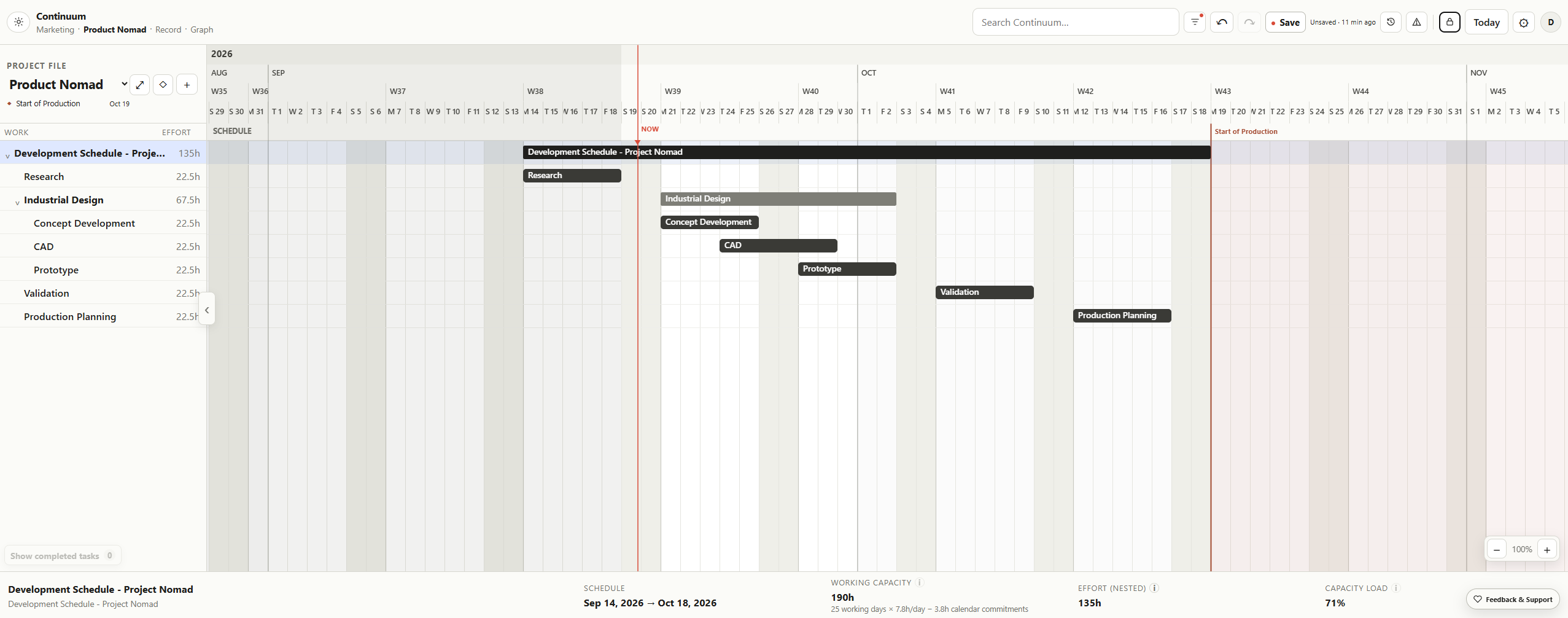
Put the work against the time you actually have.
Tasks make more sense when they live against actual days, work weeks, weekends, deadlines, and available hours.
Pan through time, change the scale, move the work, collapse the hierarchy, or edit a task. This is a simplified version of the same interaction model used inside Continuum.
WORKEFFORT
Development Schedule
135hResearch
22.5hIndustrial Design
67.5hConcept Development
22.5hCAD
22.5hPrototype
22.5hValidation
22.5hProduction Planning
22.5hWORKING CAPACITY190h
EFFORT135h
CAPACITY LOAD71%
Node Graph
See the relationships the calendar cannot show.
The timeline explains when the work happens. The graph removes time from the equation so the structure underneath the project can be seen directly.
Move the work around. Add a temporary task. Use the round ports to create hierarchy and the diamond ports to expose dependencies across projects.
Record Timeline
Progress is easier to believe when you can see it.
Work has a habit of making yesterday disappear. Record gives decisions, milestones, dev logs, and small wins somewhere to accumulate.
Drag through time and zoom into the little moments that eventually become the history of the project.
What it leaves out
Built to stay out of your way.
Continuum is intentionally not trying to become the operating system for your entire company.
It has a smaller job: help you understand the work, make the plan, and get back to building.
Continuum
Local first.
Your work lives with you.
No AI shoved into the workflow.
The tool helps you see. You still think.
No dashboard culture.
Work is not a performance metric.
No subscription for the local tool.
Buy the tool. Use the tool.
These move.
Public Beta
Continuum is ready to be tested.
It is being built by one person, and the next version should be shaped by people actually using it.
This beta is not a throwaway trial or a countdown to losing access. Use it. Push on it. Build real work with it. As Continuum matures, active development and support will eventually move to the full release.
If something is confusing, annoying, broken, or unexpectedly useful, I want to hear about it.
Local-first · No account required